
Your smartest hire needs onboarding too
Claude is capable enough that the US Defense Department is in a standoff with Anthropic over access to it. They want it without restrictions..
Claude is a powerful tool. You don't have to be a coder or military intelligence to have it improve your daily workflows.
☕️ This is a long one — grab a coffee. It covers the four files that make a Claude Project actually useful: what goes in each, how to build it, and how to keep it current.
To dive directly into action, jump to sections marked with
👉🏻 How to build yours
Your 24/7 assistant — already briefed, always ready
A Claude Project is a persistent space where your context lives — your clients, your offer, your voice, the things you'd never say. Every conversation inside it starts from that baseline automatically. No re-explaining. No correcting the same things twice.
Think of it as the onboarding you'd give a sharp new hire on day one. Not your whole backstory — just enough that they can do useful work without asking twenty questions first. Except once you've written it, you never have to do it again (You can ask it to review past conversations).
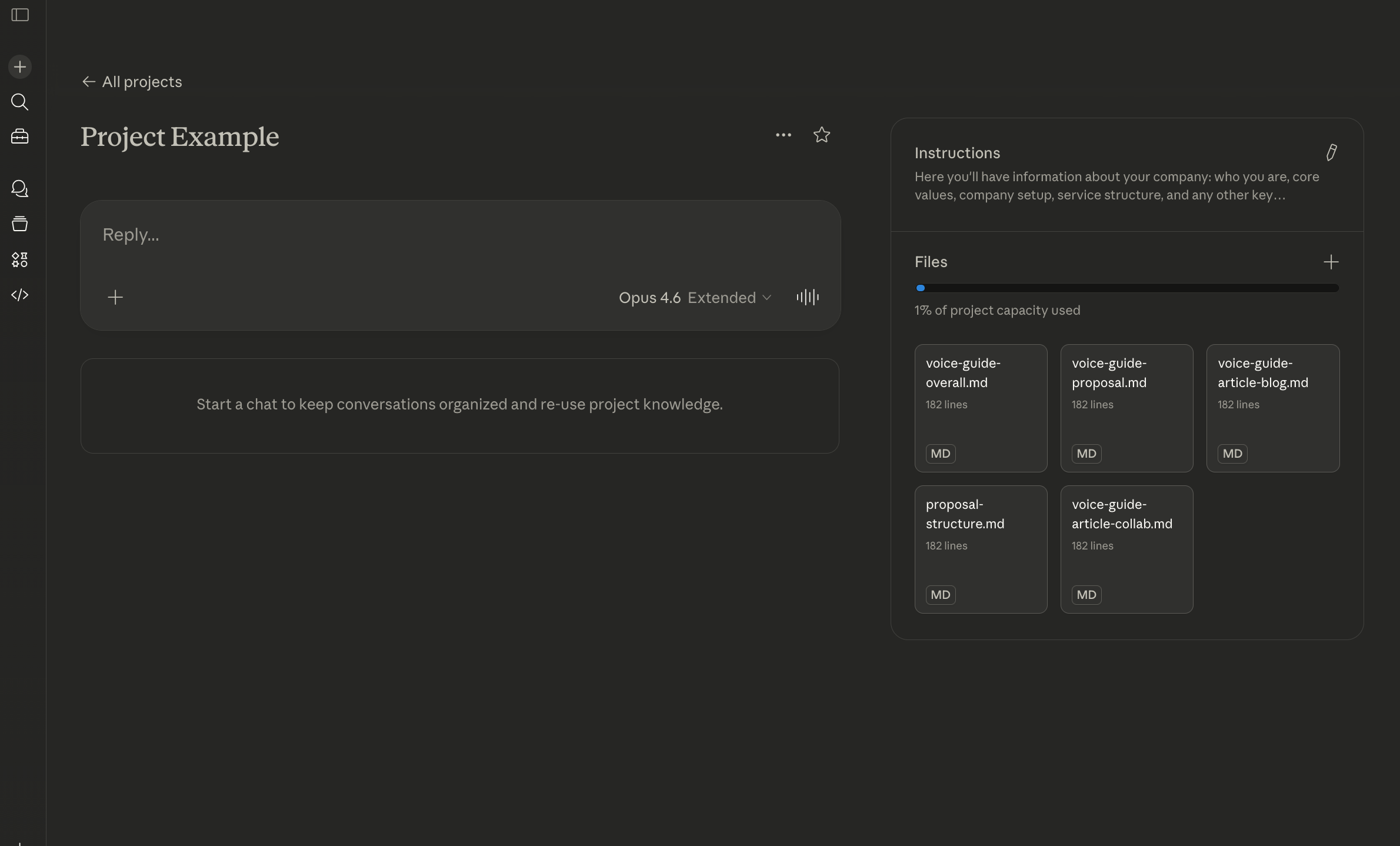 Basic setup of Claude project
The setup has four layers. This guide walks through each one — what goes in it, why it matters, and how to build it.
| File | What it does |
|---|---|
| Business context | Who you are, who you serve, what you offer, how you work — plus the strategic context (values, differentiators, direction) that sharpens Claude's judgment calls. |
| Voice guide | How you write — tone, rhythm, what you'd never say. Covers your general register across all output. |
| Use-case voice guides | One per output type that has its own distinct register — proposals, outreach, reports, content. |
| Workflow prompts | Specific, reusable instructions for recurring tasks — ICP interviews, outreach sequences, interview reports. |
The master prompt: your business context
This is the foundation. Every conversation in your Project starts here — Claude reads it before anything else.
It's a briefing note: the minimum context a competent person would need to do useful work for your business without asking twenty questions first.
What goes in it
Here's a real business context document, with notes on why each part is there.
I'm a [freelance / independent] [role] working with [specific client type] —
[descriptor 1], [descriptor 2], [descriptor 3] — who [situation that brings
them to you].
What this does: gives Claude a specific enough picture of your clients that it can tell the difference between a good prospect and a bad one. "Small businesses" is useless. The more precisely you describe who you work with, the more useful every piece of output becomes.
What I care about: [the thing that drives how you work and who you work with].
I won't work with [the hard no — a type of client, a dynamic, a brief].
This tells Claude: what a hard no looks like. Not inspiration — a decision filter. When you're assessing a prospect or drafting a proposal, Claude already knows which direction you won't go. It stops it from enthusiastically helping you pitch to clients you'd actually turn down.
Current focus: [what you're working on right now — a launch, a sales push,
a specific project]. Target: [a concrete milestone with a timeframe].
Why it changes: this is the one block that needs updating regularly — whenever your focus shifts, your pipeline moves, or your priorities change. Without it, Claude frames everything as if you're in the same stage forever. It's what keeps the document alive rather than stale.
Packages:
- [Offer name] — [price], [what it includes], [timeframe]
- [Offer name] — [price], [what it includes], [timeframe]

Never quote below [your floor rate]. Never promise [capability or scope
you can't deliver] without flagging it first.
Without this: Claude invents options that don't exist and suggests rates that undercut you. The offer structure means it can reference the right package in proposals and emails without you spelling it out each time. The lines at the bottom are the guardrails — non-negotiables Claude checks against so you don't have to remember them mid-conversation.
How I work: [fixed packages / retainer / project-based — not hourly].
All projects include [what's always included]. [How you communicate].
[Any hard limits on availability or response time].
In practice: every client communication Claude helps draft reflects this automatically. It won't contradict your working norms, won't offer what you don't sell, won't write a scope that skips what you always include. You stop correcting the same things over and over.
Going deeper: strategic context that changes output
The blocks above are the foundation — most people can stop there and get genuinely useful output. But there's a layer of strategic context that, when framed correctly, makes Claude's judgment calls sharper.
The key word is framed correctly. "Our mission is to empower creative professionals" gives Claude nothing to work with. "We exist so that people running passion-led businesses spend their time on the work, not the admin around it" tells Claude what to prioritise in every recommendation.
Each of these is optional. Skip anything that doesn't apply to your business, or that you can't write in concrete terms. An empty heading is better than a vague one.
Vision / Mission:
[What your business exists to do, written as a constraint —
not a tagline. Frame it as: "When choosing between X and Y,
we choose X because..."]
What this does: gives Claude a tiebreaker. When drafting a proposal, should it emphasise speed or thoroughness? Price or quality? This tells it which direction you lean — and keeps it consistent across every piece of output.
Skip this if: your vision is generic enough that any competitor could say the same thing. If it doesn't help Claude make a decision, it doesn't belong.
Values — as decision filters:
[Not aspirational statements. The actual principles that
determine what you say yes and no to.]

Example: "We don't take on clients who want us to validate
a decision they've already made. We're here to challenge
assumptions, not rubber-stamp them."
What this does: these become Claude's refusal criteria. When it's helping you evaluate a prospect or draft a response to an enquiry that doesn't fit, it knows which lines you won't cross — and can flag them before you spend time on something you'd turn down anyway.
Skip this if: you can't write a value that would make you lose a specific deal. "We value quality" won't change output. "We won't cut scope to hit a deadline — we'll move the deadline instead" will.
Differentiators:
[Not "what makes us special." What Claude should emphasise
when a prospect is comparing you to the realistic alternatives.]

- Compared to [competitor type A]: we [specific difference]
- Compared to [competitor type B]: we [specific difference]
What this does: when Claude drafts proposals or outreach, it positions you against the actual alternatives your prospects are weighing — not in the abstract. It stops writing generic "why us" sections and starts writing specific "why us instead of them" sections.
Skip this if: you genuinely don't know who your prospects compare you to. That's worth finding out, but don't guess here.
Competitive landscape:
[Who your prospects are also talking to or considering.
Not an exhaustive market analysis — just the two or three
alternatives that come up most often, and what's genuinely
different about each.]
What this does: feeds the differentiators above with real context. Claude can reference these alternatives when the conversation calls for it — in proposals, in objection handling, in positioning content. It's the difference between "we're different" and "here's specifically how."
Skip this if: you're in a niche where direct comparison rarely happens.
Key people:
[Brief operational bios — not LinkedIn summaries.
Name, role, relevant background, and anything Claude
needs to know when writing on their behalf or referencing them.]
What this does: if Claude is drafting something that references you or a team member, it has the right context. Background that's relevant to credibility — "12 years in financial operations before going independent" — not job titles or awards.
Skip this if: you're solo and your business context already covers your background.
Where you're heading:
[Longer-horizon than "current focus." The direction your
business is moving over the next 6–12 months, and what
that means for the kind of work you take on.]
What this does: prevents Claude from recommending things that conflict with where you're going. If you're moving away from one-off projects toward retainer work, Claude should know that before it helps you draft a proposal for a one-off project. It frames forward-looking content accurately.
Skip this if: your direction is genuinely uncertain. Don't write aspirational goals here — write plans you're already acting on.
You're not convincing Claude of anything
The master prompt is a briefing, not a brand deck. Claude doesn't need to believe in your business. It needs to understand how it works — and what you'd say no to.
That distinction matters because a lot of "strategic" content is just self-talk dressed up as instructions. "We believe in transparency" is wall art. Claude reads it and does nothing differently. But "Never downplay a limitation to close a deal — name it and explain how we work around it" is a decision filter. Claude will actually use that when drafting a proposal.
The test for whether something belongs: would removing it change Claude's output? If the answer is no, it's decoration. If yes, it earns its place — even if it sounds like a mission statement.
Your marketing language still has a home — just not here. The phrases you use to describe what you do, the tone of your best-written proposal, the way you open a cold email that actually gets replies — that's all material for your voice guide, which we'll get to next.
👉🏻 How to build yours
Don't start from a blank page. Let Claude interview you.
Open a new chat — not inside your Project yet — and paste this:
I want to set up a master context document for a Claude Project —
a file that tells you about my business so you can help me better.

Interview me about:
- My role and what I do day-to-day
- Who I work with and who I won't work with
- What I offer, including pricing and scope
- How I work (communication, availability, process)
- What I'd say no to — the lines I won't cross
- Who my prospects compare me to, and what's actually different
- Where my business is heading over the next 6–12 months
- Anything else you think would help you help me

Ask one question at a time. When we're done, write the document for me.
Answer as specifically as you can. When it's done, read it back critically. The test: is there anything here that a generic freelance [your profession] could also say? If yes, make it more specific. Cut anything that sounds like positioning. Add anything operational that's missing.
If you prefer structure over conversation, use this prompt instead. It walks through the same ground but with explicit headings — useful if you already know what belongs in each section and want to fill them in directly:
Help me build a business context document for a Claude Project.
Walk me through each of these sections one at a time.
Ask me questions to fill each one — don't fabricate anything.
If I can't answer a section concretely, leave it blank
with a note on what's missing.

Sections:
1. Who I am, what I do, who I work with
2. What I offer — packages, pricing, scope
3. How I work — process, communication, constraints
4. What I say no to — hard limits, deal-breakers
5. Vision / mission — as a decision filter, not a tagline
6. Values — the principles that determine what I accept and reject
7. Differentiators — what to emphasise vs. specific competitors
8. Competitive landscape — who my prospects also consider
9. Key people — brief operational bios
10. Current focus — what I'm working on right now
11. Where I'm heading — direction over the next 6–12 months
Save it as a file in your Project — business-context.md works fine. Or, what I
do, I paste it directly inside the project instructions.
Not every section will apply to every business. Skip what doesn't fit. The first four sections do most of the work — the rest makes Claude's judgment calls sharper when it matters.
This is the one document that needs updating when your business changes. New offer, new focus, new constraint — update it. Everything else in the Project builds on this.
What it looks like — two examples
Freelance UX designer, 3 years in, solo
I'm a freelance UX designer working with early-stage SaaS startups (seed to Series A).
My clients are typically non-technical founders who have a working product but poor
usability — they know something's wrong but can't name it.

What I care about: making products that real people can actually use, not award-winning
interfaces that look good in a portfolio. I work best with founders who are curious about
their users, not ones who already know the answer and want me to validate it. I won't
take on work where the brief is "make it look better" — that's not a UX problem.

Current focus: closing two new clients before end of Q2. I'm in active conversations
with three prospects and need to move them from "interested" to "contracted."

I offer two things: a UX Audit (£2,500, two weeks, written report + one presentation call)
and a Design Sprint (£8,000, six weeks, wireframes + prototype + handover session).
I don't do ongoing retainers — projects only. I don't build in Figma for clients to hand
off to other designers; I hand off to their developers.

I respond to clients within one working day. I work Monday to Thursday. I don't take
rush work at standard rates.

Never quote below £2,500 for any engagement. Never promise a full product redesign —
that's out of scope for both packages.

Differentiators:
- Compared to agencies: I'm one person. No account manager layer, no handoff between
  "the person you spoke to" and "the person doing the work." Faster, cheaper, and you
  get direct access to the person making design decisions.
- Compared to full-time hires: I cost less than a month of a senior UX salary and
  deliver a concrete output with a defined end date. No onboarding, no benefits overhead.

Where I'm heading: building a referral pipeline so I'm not dependent on cold outreach
by end of year. Considering a group workshop format for founders who aren't ready for
a full audit.
Independent executive coach, established practice
I'm an executive coach working with senior leaders (director level and above) in
professional services — law, finance, consulting. My clients are high performers with
blind spots, not people in crisis. They don't want therapy; they want a thinking partner
who will tell them things their colleagues won't.

What I care about: honest conversations that actually change behaviour, not comfortable
ones that make people feel good for a week. I work with people who want to be challenged,
not managed. I won't take on clients whose organisations are sending them to coaching as
a performance management workaround — that dynamic doesn't produce real work.

I've been practising for 11 years. I'm accredited with the ICF at PCC level.
I work with individuals only, not teams or organisations.

Current focus: filling two spots in my September cohort and writing the proposal for
a corporate programme with a law firm (initial scoping call done, proposal due 15 March).

I offer: individual coaching engagements (six months minimum, £750/session, weekly),
and occasional corporate programmes (bespoke pricing, minimum £15,000).
I don't do one-off sessions.

I communicate with clients by email only. No WhatsApp. No same-day responses.

Never suggest pricing below £750/session. Never frame coaching as solving a problem —
it's developing a capability.

Values as decision filters:
- If a client wants me to tell them what to do, that's consulting — not coaching.
  Redirect or decline.
- I won't take on engagements where the sponsor (usually HR) has a predetermined
  outcome. The coaching relationship is with the individual, not the organisation's
  agenda.

Competitive landscape:
- Most prospects compare me to internal coaching programmes (free but generic) and
  large coaching firms (BetterUp, CoachHub). I'm the opposite: expensive, selective,
  and fully independent. That independence is the point — I'm not reporting to their
  employer.
The voice guide: sound like yourself, every time
The business context document tells Claude what you do. The voice guide tells it how you sound doing it.
The voice guide avoids your writing to sound like millions newsletters out there. It's a description of your writing patterns — your tone, your rhythm, the phrases you'd never use (or prefer to use), the things that make your writing recognisably yours. Once it's in the Project, every piece of output starts from your baseline rather than Claude's.
The general voice guide
This is the overarching file — it applies to everything Claude writes for you, regardless of the task. Think of it as the floor: the non-negotiables about how you communicate that never change whether you're writing a proposal or a LinkedIn reply.
It has four parts:
- Tone descriptors: three to five words that capture your register
- What you'd never say
- Rhythm and structure: how long are your sentences? Preference to bullet points?
- What you sound like at your best
What it looks like — annotated
Tone: direct, curious, grounded. Warm but not soft.
Never motivational-speaker energy.
What this does: "direct, curious, grounded" is a constraint, not a compliment. Claude will test output against it — would a motivational speaker say this? If yes, cut it. Three words does more work than a paragraph of description.
Never say:
- "leverage", "unlock", "dive in", "game-changer"
- "I hope this finds you well"
- "Great question!" or any variant
- Anything that starts with "In today's fast-paced world..."
- Rule of three lists that exist just to sound punchy
In practice: this is the AI slop filter. These patterns show up because Claude was trained on millions of examples that use them. Naming them explicitly is faster than correcting them after the fact — every single time.
Structure: prose over bullet points unless the content genuinely needs
a list. Short paragraphs. One idea per paragraph.
Lead with the point, not the context.
What this does: tells Claude how to organise output before it starts writing, not after. "Lead with the point" alone eliminates a surprising amount of throat-clearing.
Voice samples:
[Sample 1 — e.g. a client email you were happy with]
[Sample 2 — e.g. a proposal paragraph that landed]
[Sample 3 — e.g. a message that got a reply]
This tells Claude: what good actually looks like, in your words. Descriptions of voice are useful. Examples are better. Include both.
👉🏻 How to build yours
Gather three to five pieces of writing you're proud of — sent emails, proposal sections, social posts, anything. Paste them into a new chat and ask:
Based on these examples, describe how I write.

What patterns do you notice in my sentence length, tone, and structure?
What do I seem to avoid? What phrases or rhythms are distinctly mine?

Then write a voice guide I can save to a Claude Project —
tone descriptors, a banned words list, structural notes, and
the samples themselves as reference.
Read it back and correct what's off. The first draft will be close but not exact — that's normal. Add anything it missed, remove anything that isn't quite right.
Save it as voice-general.md in your Project.
Use-case guides: one register per output type
Your general voice guide is the floor. Use-case guides are the calibration on top of it.
A proposal and a cold outreach message are both written by you but they don't sound the same. The proposal is analytical, structured, slightly more formal — it needs to earn trust over several paragraphs. The outreach message is brief, specific, probably warmer, and has one job: make someone curious enough to reply.
Without use-case guides, Claude makes assumptions and provides output that's vaguely in your tone but may be pitched at the wrong level for the context.
Each use-case guide covers:
- Goal — what this piece of writing needs to achieve
- Register — how it differs from your general voice
- Structure — what good looks like, in what order
- Guardrails — what to avoid specifically in this context
Use-case guide: proposals
Goal: earn trust and move the prospect to a yes.
Not convince — confirm. By the time someone reads a proposal,
they're already interested. The proposal just needs to not lose them.
What this does: reframes what Claude is optimising for. "Persuasive proposal" produces something that tries too hard. "Confirm, don't convince" produces something that's calm and confident — which is what actually closes.
Register: more considered than my general writing.
Structured. Still direct — no filler, no corporate padding.
The client should feel like I've understood their specific situation,
not that I've adapted a template.
Structure:
1. Their situation, in their words — show you listened
2. What you're proposing and why it fits
3. What's included, what's not, what happens when
4. Price — stated clearly, not buried
5. Next step — one action, not a menu of options
In practice: Claude follows this order without being asked each time. No more proposals that open with your agency background or end with three different ways to proceed.
Never in a proposal:
- "I'd be happy to..."
- Vague scope language ("we'll work together to explore...")
- Price buried at the end after a long justification
- More than one call to action
ps: in my Claude project instruction, I do include my blindspots/ habits I would like to unlearn that often make their ways into my business proposals. Claude points this out when I start to show this behaviour and asked if we would still proceed with this regardless. Ouch.
Use-case guide: outreach
Goal: one reply. Not a sale, not a meeting — just a reply.
Write as if the message might be the only thing they read today.
Register: shorter than anything else I write.
One observation, no pitch. Sounds like something I'd say
in passing, not something I composed.
What this does: "sounds like something I'd say in passing" is a more useful constraint than "be conversational." Claude knows what passing sounds like.
Structure:
1. One specific, business-relevant observation (not a compliment)
2. A light connection to something you've seen or know
3. No question, or one soft curiosity hook — never both
4. No CTA in the first message
Without this: Claude defaults to the three-part outreach structure it's seen a thousand times — compliment, pain point, call to action. Reply rates drop. This structure produces messages that feel unfinished in the right way — they invite a response rather than demanding one.
Never in outreach:
- Opening with "I came across your profile and..."
- Mentioning your offer in the first message
- Fake flattery ("Your work on X really stood out to me")
- More than 3 sentences
- Any form of "I'd love to connect"
👉🏻 How to build your use-case guides
For each output type you produce regularly, open a chat and ask:
I need to write a voice guide for [proposals / outreach / articles / reports].

Here are two or three examples of [this output type] I'm happy with:
[paste examples]

Describe what makes these work — the register, the structure,
the things I seem to avoid. Then write a use-case voice guide
I can save to a Claude Project.
Start with the two output types that take you the longest or that you're least happy with. Those are where the guide does the most work.
Save each one as its own file — voice-proposals.md, voice-outreach.md, and
so on. Keep them separate from the general guide so you can update them
independently as your style evolves.
Workflow prompts: recurring tasks, done properly
Voice guides tell Claude how you sound. Workflow prompts tell it how to run a specific process.
The difference between a workflow prompt and a one-off instruction is this: a workflow prompt lives in the Project permanently, recognises when it's needed, pulls the right voice guide automatically, and produces the right output — without you explaining any of it. You just trigger it.
Short trigger in. Finished output out.
What a workflow file actually looks like
The file has four parts working together:
- Trigger phrases — the shorthand you'll actually type. Claude watches for these and knows which process to run.
- Inputs — what you need to provide. Usually just the raw material: notes, a name, a LinkedIn profile.
- Process — what Claude does with the inputs, in what order.
- Output routing — which voice guide to pull, based on who the output is for.
Here's what that looks like in practice.
Workflow file: discovery interview
Save as workflow-discovery.md
## Trigger phrases
"Running an interview with [name]"
"About to jump on a call with [name]"
"Help me run a discovery with [name]"

## What I'll give you
- Name and brief context on who I'm speaking with
- Notes or quotes as the conversation happens,
  or all at once afterwards

## What you do
Stay in capture mode. Do not interpret or recommend yet.

As I share notes, identify and track:
1. Specific operational pain points — name the process, name the tool
2. Any workarounds — things they've built because the right solution
   doesn't exist
3. Their exact words when describing a problem —
   paraphrase loses meaning here
4. Tools and systems mentioned, and how they actually use them

Do not fill gaps. If something is unclear, flag it.

## When I say "wrap up" or "that's everything"
Produce a structured capture summary:

- **Situation** — what their operation looks like right now
- **Friction** — where they're losing time or energy, specifically
- **Their words** — direct quotes that capture the problem best
- **Signal** — what suggests readiness or fit
- **Open questions** — what we still don't know

This summary feeds the post-interview synthesis. Hold it until asked.
Workflow file: post-interview synthesis
Save as workflow-synthesis.md
## Trigger phrases
"Draft the interview report for [name]"
"Turn my notes into a report — [name]"
"Synthesise the interview with [name]"

## What I'll give you
Either:
- The capture summary from the discovery workflow, or
- Raw notes directly if no discovery prompt was used

## What you do
First, decide the output format based on my trigger:
- "internal" or no qualifier → plain language summary, no polish needed
- "client-facing" or "report" → follow voice-proposals.md register
- "DRC" or "reality check" → follow the DRC report format

Then produce:

**Situation** — their operation in plain terms.
Specific enough that a stranger would understand it.
Use their words where they were precise.

**Where time is going** — name the manual processes,
the workarounds, the tools that don't talk to each other.
Concrete, not abstract.

**What they actually want** — not the surface request.
The underlying one. What would their work look like if this were solved?

**Fit** — where there's a clear match with what I offer.
Where there are gaps or open questions.

**Suggested next step** — one action. Not a menu.

Do not invent detail. If the notes don't cover something,
leave a [flag: missing] marker rather than filling it in.
Workflow file: outreach
Save as workflow-outreach.md
## Trigger phrases
"Draft outreach for [name]"
"Write a first message to [name]"
"Outreach — [name or context]"

## What I'll give you
One of:
- A LinkedIn profile or URL
- A short description of who they are and why I'm reaching out
- Notes from a referral or event context

## What you do
Follow voice-outreach.md — not the general voice guide.
The register is shorter and more restrained than anything else I write.

Produce one message only. Evaluate the input for:
1. One business-relevant signal (not a personal detail, not a compliment)
2. A light connection to something I've seen or know

Then write:
- Under three sentences
- One observation, one connection
- No pitch, no CTA
- No question, or one soft curiosity hook — never both

If the input doesn't contain a usable signal, say so
rather than inventing one. Bad personalisation is worse than none.
How it works in practice
Once these files are in your Project, the conversation looks like this:
"Draft the interview report for Abby — here are my notes: [paste]"
Claude reads the trigger, loads workflow-synthesis.md, checks whether the
output is internal or client-facing, pulls the right voice guide, and produces a
structured report. You review the output in the structure & format that you have
specified and send.
The trigger phrases are the key — keep them short and natural, the way you'd actually type them. Claude matches loosely, not literally, so "write up my Abby interview" works just as well as the exact phrase in the file.
👉🏻 How to build yours
Start with the task you repeat most. Open a chat in your Project and ask:
I want to create a reusable workflow prompt for [task].

Here's how the process works: [describe it step by step]
Here's what the output needs to look like: [describe the format]
Here's which voice guide it should use: [name the file]
Here's what I always have to correct: [list the recurring issues]
Here are the trigger phrases I'd naturally type: [list them]

Turn this into a workflow file I can save to my Project.
The trigger phrases and the recurring corrections are the two inputs that make the file actually work. Everything else Claude can infer. Those two it needs from you.
What this looks like when it works
A concrete example. After an ICP discovery call — an hour spent mapping a potential client's tools, their time drains, and what they actually want their life to look like — the raw notes becomes a structured summary in seconds. A report that's specific to them, in language that doesn't sound like an AI bot wrote it, focused on the things that will actually land.
Without a setup: an hour of notes becomes another hour of writing, formatting, second-guessing the choice of words.
With a setup: the notes go in. Claude already knows the report structure, the voice, what a good insight looks like versus a generic observation. What comes out needs a review and some tweaks — not a rewrite.
That's not replacing the thinking. The hour of actual conversation still happens and your expertise still informs the recommendations. The judgment call about what matters still happens. Claude handles the translation from raw material to finished output.
The 80/20 rule — your name is still on it
The realistic target isn't perfection. It's getting Claude to handle 80% of the work so you spend your time on the 20% that actually needs you.
Think of it as managing a junior consultant. They do the research, the first draft, the formatting, the structure. You review, correct course, add the judgment calls that only you can make — and sign off.
The output is still yours. The thinking is still yours. Claude just handled the part that didn't need to be you. That's what good setup makes possible. Not replacing your work. Freeing you to do the part of it that matters.
Run the same task twice: once in a fresh chat with no context, once inside your Project. If the Project version isn't noticeably better, your documents need more specificity. Go back and add concrete examples — real phrases you use, real clients you work with, real output you're proud of. The more specific the input, the more useful the output.
Keeping it alive
A Project you set up once and forget will drift. The voice stays accurate, the workflow prompts keep running — but the business context goes stale. Claude is still writing proposals for the quarter you were in six months ago.
The Project has two places to put things: the instructions field and uploaded files. Keep anything sensitive — pricing, hard limits, current pipeline — in the instructions field. Voice guides, workflow prompts, and examples go in uploaded files.
Each file type has its own maintenance rhythm:
| File | Where | How often |
|---|---|---|
| Business context | Instructions field | Monthly — update whenever your focus, offer, or constraints change |
| Voice guides | Uploaded files | Rarely — only when you notice a consistent gap, or you shift your messaging approach |
| Workflow prompts | Uploaded files | When the process changes — if it's working, don't touch it |
The self-audit
Every few weeks, open your Project and ask:
Based on our recent conversations in this Project, where have I been
inconsistent with my own instructions? What patterns do you notice —
in how I write, what I ask for, what I keep correcting?
Claude will tell you where you've drifted from your own setup — and where the setup itself might need updating because your business has moved on. Five minutes. Keeps the whole system honest.
What about Claude Cowork?
At the point this article is written, Claude Cowork is Mac-only.
Anyway, the key to make Cowork a gamechanger is a properly setup Claude Project — so everything above is a prerequisite, not interchangeable. Without a Project, Cowork has no context to work from and will still behave like generic chatbot.
What it adds is physical output. Think of Claude (and project as extension) as a brain. Cowork gives it hands & feet to move around in your computer, touching files. Code is similar but with ability to access tools (imagine screwdriver or hammers).
Where the chat interface produces text you copy and paste elsewhere, Cowork writes actual files to your computer. If you point it at a folder, give it the right inputs, and it generates — a formatted report, a slide deck built from a template, a document dropped straight into the right directory.
A practical example: in a folder containing a PowerPoint template and an interview transcript, Claude Cowork can produce a finished presentation file. The Project supplies the context (your voice, your structure, what a good report looks like); Cowork handles the last step of getting it onto your machine in the right format. You will want to review and gives it the final pizzazz but you have a working draft in seconds.
Every operation is different. The files are the same — the content is entirely yours.
If you're not sure what to put in your setup, the Reality Check is a good place to start. Thirty minutes, we look at where your time goes, and you leave knowing exactly what's worth fixing — including whether any of this is the right place to start.
No pitch. Just a conversation towards clarity.
Cheers! 👋🏼
Amanda